CTR Tool Costs for Search Engine Rankings: Pricing Guide
You are weighing a monthly fee against rankings you cannot see yet. Before committing budget, you need the actual credit math: what each visit costs, which plans fit which campaign volume, and where charges stop.
This guide breaks down CTRTool's three plans, from $59 to $399 per month, and explains how credits convert to Desktop and Mobile visits. You will also see what every plan includes, which cost factors move your monthly spend, and how to judge whether the price matches what you get.
What Is CTRTool? Campaign Types, Platforms and Who It Serves
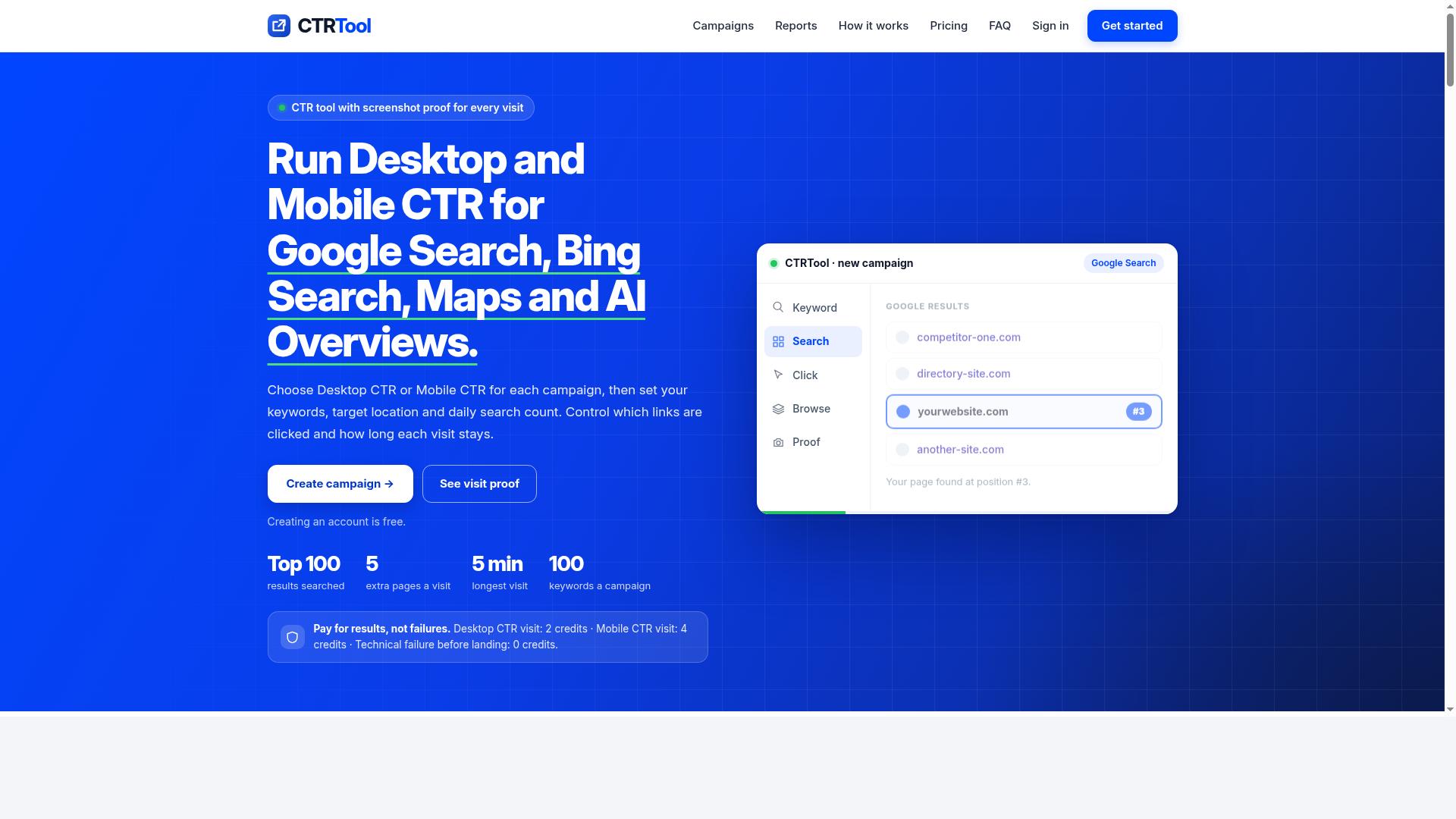
CTRTool is a SaaS platform that runs click-through rate (CTR) campaigns for Google Search, Bing Search, Google Maps, and AI Overviews, with screenshot proof for every visit. It is built for SEO teams that want to influence click-through rate as a ranking signal and back every campaign with documented evidence.
Instead of treating CTR as a black box, the platform turns it into a repeatable workflow. You pick a campaign type, define your keywords and location, and CTRTool delivers visits through real browser sessions. Each visit is captured with screenshots, so you can review what happened rather than trust a dashboard count.
The tool supports four distinct campaign types, each matched to a different part of the search experience:
- Google Search CTR: searches a keyword and clicks the organic result, with Desktop or Mobile mode, coverage across the Top 100 results, and support for internal pages.
- Bing Search CTR: the same keyword-and-click workflow applied to Bing search results.
- Google Maps CTR: finds a business listing and clicks its website link, with up to 50 listings and city targeting.
- AI Overview CTR: locates your website in an AI Overview and clicks the source link, tracking citation order.
Campaign setup is granular without being complicated. Users choose Desktop CTR or Mobile CTR for each campaign, then set the target keyword and location. Country, state and city targeting are available, or you can leave the country as Any.
From there, you can configure up to 100 keywords per campaign, search depth up to 100, and daily search counts with now, spread out, or gap timing. Days, hours and time zone are all adjustable, with daily goals resetting at 00:00 UTC. You also define the target URL, internal page URLs, link text, click order, scrolling time, up to five additional pages per visit, and visits of up to five minutes total.
Delivery runs through Desktop Chrome windows and real Android phone sessions. Each session is matched to the target location through managed proxy routes, which keeps device and geography aligned with the campaign settings. Screenshot proof accompanies every visit, and reports show full visit paths, search and website screenshots, plus keyword positions over time across Search positions, Maps listing order, and AI citation order.
Custom form filling and other custom actions are available through support with a separate agreed one-time fee. That gives teams a path for actions beyond the standard campaign types.
The platform serves SEO practitioners and agencies running campaigns for their own or client websites. Practitioners use it to support keyword rankings and organic traffic goals on specific pages. Agencies value the per-campaign structure and screenshot reporting because it gives clients something concrete to review.
If you manage multiple properties, the keyword and location controls scale to that workload without changing the underlying workflow. Understanding these campaign types and audience fit is the foundation for evaluating the cost structure covered later in this pricing guide.
What Does CTRTool Cost? Direct Pricing Answer
CTRTool offers monthly subscription plans priced in USD: Starter at $59/month for 2,000 credits, Growth at $125/month for 5,000 credits, Scale at $399/month for 20,000 credits, and Agency at $699/month for 40,000 credits.
Every plan runs on the same credit-based cost structure. Credits are consumed when visits are delivered, so the plan you choose determines how much campaign volume you can run each month. The Growth plan carries the Recommended label on the pricing page, making it the middle option the brand points to most often.
All prices are displayed in USD and billed monthly. A few practical points sit alongside the tiered pricing:
- Creating an account is free, so you can review the tool before committing to a subscription.
- Unused credits roll over while your subscription stays active, and they expire once a cancellation takes effect.
- The site notes a limited launch pricing window: prices rise 30% on November 15.
The table below summarizes the plans at a glance. Credit costs per individual visit are covered in the next section of this pricing guide.
| Plan | Monthly Price | Credits | Desktop CTR Visits | Mobile CTR Visits |
|---|---|---|---|---|
| Starter | $59 | 2,000 | Up to 1,000 | Up to 500 |
| Growth (Recommended) | $125 | 5,000 | Up to 2,500 | Up to 1,250 |
| Scale | $399 | 20,000 | Up to 10,000 | Up to 5,000 |
Starter Plan: $59/Month for 2,000 Credits
The Starter plan costs $59 per month and provides 2,000 credits, which translates to up to 1,000 Desktop CTR visits or 500 Mobile CTR visits.
This is the entry-level tier in CTRTool's subscription plans. It suits small campaigns, early testing, and users who want to see how behavioral SEO signals behave before scaling spend. If you are new to CTR tools and want a low-commitment starting point, Starter keeps the monthly outlay modest.
All plans include the same core features, such as screenshot proof and the available campaign types. The difference between tiers is credit volume, not capability. That means a Starter subscriber is not locked out of anything fundamental; the ceiling is simply how many visits the credit allowance supports.
Because credits roll over while the subscription is active, a quieter month on Starter does not automatically waste the allowance. Credits carry forward until cancellation takes effect, which gives small campaigns some breathing room between active periods.
For anyone weighing whether a CTR tool is worth it at all, Starter is the lowest-cost way to find out. It is also the tier most exposed to the announced price increase, since a 30% rise on November 15 lifts the entry price noticeably.
Growth Plan: $125/Month for 5,000 Credits (Recommended)
The Growth plan is priced at $125 per month for 5,000 credits, supporting up to 2,500 Desktop CTR visits or 1,250 Mobile CTR visits.
CTRTool marks this tier as Recommended, and the reasoning is straightforward: it balances cost and volume for growing campaigns. Starter can feel tight once a campaign runs consistently, while Scale may be more than a mid-sized operation needs. Growth sits in the middle with room to run steady campaigns without overpaying for capacity you will not use.
It includes all standard features, the same set offered across every tier. The value here is not extra functionality but more headroom per dollar than the entry plan, which matters when a campaign depends on sustained visit delivery rather than a short test.
Teams running behavioral SEO alongside rank tracking and competitor analysis often find that consistent daily volume matters more than occasional bursts. Growth supports that pattern better than Starter, and its rollover behavior means a slow month does not erase the allowance.
For most readers of this pricing guide, Growth is the sensible default. It is the plan the brand itself recommends, and it avoids both the constraints of the smallest tier and the commitment of the largest.
Scale Plan: $399/Month for 20,000 Credits
The Scale plan costs $399 per month and offers 20,000 credits, enough for up to 10,000 Desktop CTR visits or 5,000 Mobile CTR visits.
This is the highest tier among the three headline plans, built for large campaigns and agencies managing substantial volume. It includes all standard features, so the differentiator is pure capacity rather than added tools.
Scalability is the point of Scale. At 20,000 credits, the effective cost per visit drops compared with the lower tiers, which makes it the more efficient choice when you know you will use the allowance. Agencies running campaigns across multiple clients fit this profile well, since spreading a large credit pool across projects keeps the cost structure predictable.
Rollover adds flexibility at this level too. Unused credits carry forward while the subscription remains active, so a large allowance is not lost to a single slow period. Credits expire only once cancellation takes effect.
Scale is not the absolute top of the range. CTRTool also lists an Agency plan at $699/month for 40,000 credits (up to 20,000 Desktop or 10,000 Mobile visits) for enterprise licensing needs. For most high-volume users below that threshold, Scale delivers the balance of capacity and cost efficiency this pricing guide highlights.
How the Credit Model Works and What You Actually Pay Per Visit
CTRTool uses a credit-based model where each campaign visit consumes credits, with Desktop visits costing fewer credits than Mobile visits. You buy a monthly plan that includes a set number of credits, and those credits are drawn down as visits are delivered. There is no pay-per-click model here, so you are not bidding on keywords or paying per click in the search results.
This cost structure makes budgeting predictable. Instead of watching a variable click bill climb, you know exactly how many credits each plan carries and how many visits those credits can fund. The table below shows what each subscription plan delivers.
| Plan | Monthly Price | Credits | Desktop Visits | Mobile Visits |
|---|---|---|---|---|
| Starter | $59/month | 2,000 | Up to 1,000 | Up to 500 |
| Growth (Recommended) | $125/month | 5,000 | Up to 2,500 | Up to 1,250 |
| Scale | $399/month | 20,000 | Up to 10,000 | Up to 5,000 |
| Agency | $699/month | 40,000 | Up to 20,000 | Up to 10,000 |
Two other credit rules matter for planning. A verified search without a match costs 1 credit, and unused credits roll over while your subscription stays active, expiring only when a cancellation takes effect. Creating an account is free, so you can review the plans before committing to monthly billing.
Desktop vs Mobile Credit Costs per Visit
A Desktop CTR visit costs 2 credits, while a Mobile CTR visit costs 4 credits, making mobile campaigns twice as credit-intensive. This is the core of the per-visit cost structure and the number you should use when mapping credits to campaign goals.
- Desktop visit: 2 credits, so 2,000 credits fund up to 1,000 Desktop visits
- Mobile visit: 4 credits, so 2,000 credits fund up to 500 Mobile visits
- Verified search with no match: 1 credit
- Technical failure before landing: 0 credits
The plan examples show how the doubling plays out across tiered pricing. The Starter plan at $59/month carries 2,000 credits, enough for 1,000 Desktop or 500 Mobile visits. Growth at $125/month holds 5,000 credits, covering 2,500 Desktop or 1,250 Mobile visits.
The pattern holds at the upper end. Scale at $399/month includes 20,000 credits, which fund up to 10,000 Desktop or 5,000 Mobile visits. Agency at $699/month provides 40,000 credits, or 20,000 Desktop and 10,000 Mobile visits at most. Because the ratio is fixed at 2 to 4, you can compare plans by simply halving or quartering the credit total.
Choosing between device types comes down to how your target keyword rankings and organic traffic split across devices. If your audience skews toward phones, expect your credit burn to run twice as fast for the same visit count. Budgeting on the Mobile rate keeps your plan sized safely for either mix.
No Charges for Technical Failures Before Landing
CTRTool does not charge credits for visits that fail to reach the landing page due to technical issues before landing. If something breaks during the process and the page is never reached, no credits are deducted. This protects your balance from paying for incomplete visits.
The rule is simple to apply. A visit that successfully reaches the landing page is charged at the normal rate, 2 credits for Desktop or 4 for Mobile. A visit that fails before landing costs nothing. A verified search that finds no match costs 1 credit.
This policy reduces wasted spend and keeps your credits tied to valid visits only. For anyone running ongoing campaigns to support search engine rankings, that matters. The cost structure stays aligned with delivered work rather than attempted work.
It also makes the credit balance easier to trust. You can review usage against your plan knowing that pre-landing failures are excluded from the count. Combined with rollover on active subscriptions, the model keeps your monthly billing focused on visits that actually count.
What's Included in Every Plan at No Extra Cost
Every CTRTool plan includes screenshot proof for each visit, full visit paths, keyword position tracking, and access to all campaign types without additional fees. These are core features of the product, not add-ons reserved for higher tiers, so the value of any plan is not reduced by hidden extras.
For anyone comparing CTR tool pricing, this matters. A low headline price can mean little if proof, tracking, or campaign access sits behind an upgrade. CTRTool keeps these essentials available on every plan.
Screenshot proof is one of the most practical inclusions. Each visit produces a search screenshot and a landing screenshot as separate proof images. That gives advertisers clear visual evidence of what happened during a visit, rather than a bare log entry.
Full visit paths are included as well. Instead of showing only a single page view, the tool records the route a visitor takes. This helps advertisers see how a visit unfolds and judge whether the behavior looks natural.
Keyword position tracking is part of the standard package, and it covers more than classic organic results. Positions are tracked over time, including Maps listing order and AI citation order. As SERP features and AI answers reshape visibility, tracking these placements gives a fuller picture of keyword rankings.
All campaign types are supported on every plan. That includes:
- Google Search
- Bing Search
- Maps
- AI Overviews
One shared credit balance covers all campaign types, websites, and keywords, so advertisers are not forced to buy separate pools for each channel.
None of these features carry an extra charge. There are no additional fees for screenshot proof, visit paths, position tracking, or campaign access. The cost structure stays simple: the plan covers the core capabilities, and advertisers are not nickel-and-dimed for essentials.
The pay-for-results credit model reinforces this. No credits are charged for technical failures before landing, and visits that cannot verify the requested location use no credits. Combined with the universal inclusions above, every plan delivers the same foundational toolkit for improving click-through rate and monitoring search engine rankings.
Cost Factors That Affect Your Monthly Spend
Your monthly CTRTool spend is primarily determined by the plan you choose, but campaign type, daily search count, and location targeting can influence how quickly credits are consumed. In other words, these variables change your burn rate, not the sticker price of your subscription.
CTRTool sells credits, and each action draws from a single shared balance. A Desktop CTR visit costs 2 credits, a Mobile CTR visit costs 4 credits, a verified search without a match costs 1 credit, and a technical failure before landing costs 0 credits. Every campaign you run pulls from that same pool.
That distinction matters for budgeting. Two accounts on the identical Starter plan at $59/month for 2,000 credits can end the month in very different places depending on how they configure their campaigns. One may coast on unused credits that roll over while the subscription stays active, while another runs dry early.
The sections below break down each factor so you can plan credit use with more confidence and avoid surprises mid-cycle.
Campaign Type: Google Search, Bing, Maps and AI Overviews
Different campaign types may have varying credit costs or requirements, with AI Overview campaigns needing a matching source link and Maps campaigns checking up to 50 listings. All campaign types are available on every plan, so the plan you pick does not lock you out of any of them. What changes is how many credits a given campaign tends to draw.
Google Search and Bing Search campaigns operate on broadly similar terms, since both target standard organic results for your chosen keyword and location. The page you are promoting must appear within the top 100 organic results for that keyword and location before a campaign can proceed.
Maps campaigns are heavier by nature. CTRTool checks up to 50 listings, roughly five pages, which means more searching work behind the scenes and potentially a higher credit draw per cycle.
AI Overview campaigns carry an eligibility condition: they need a matching source link. If your page does not match, the campaign cannot run as intended. Because these rules differ by type, credit consumption varies even when the plan price stays fixed.
Daily Search Count, Location Targeting and Campaign Volume
Higher daily search counts and broader location targeting increase credit consumption, so campaigns targeting multiple countries or high-frequency keywords will use credits faster. The daily search count is the simplest lever: more searches per day means more credits spent per day. Daily goals reset at 00:00 UTC, giving you a clean slate each cycle.
Location targeting adds another layer. CTRTool lets you target a chosen country and optionally a state and city, or select "Any country" to use a mix of supported locations. Location records come from CountryStateCity via the @countrystatecity/countries 2.0.0 package. Some locations may be more competitive or require more resources, which can raise effective cost.
Campaign volume multiplies everything. One balance covers all campaigns, with support for up to 100 campaigns and 100 keywords per campaign. Running many at once compounds credit use quickly.
Practical advice: watch your credit balance regularly, trim daily counts on low-priority campaigns, and narrow targeting where a broad mix is not needed. Mobile visits cost double Desktop visits, so weighting toward Desktop can stretch the same balance further.
Is CTRTool Worth the Cost? Value Against What You Get
CTRTool's value lies in its screenshot proof for every visit, full visit paths, and keyword position tracking, which provide verifiable evidence of campaign performance. Instead of asking buyers to trust a dashboard number, the platform shows the actual search and landing screenshots as separate proof images. That level of accountability is the core of the value proposition.
When you break the cost down per visit, the math is simple. At $59 for 1,000 Desktop visits, the effective cost is roughly $0.059 per visit. Compare that to the price of a single pay-per-click click in most competitive niches, and the per-visit figure looks modest. The difference is that you are paying for organic-style engagement rather than ad inventory.
What separates CTRTool from many CTR tools is the proof layer. Screenshot evidence and visit paths let you audit what actually happened, not just what a report claims. For teams running behavioral SEO campaigns, that traceability matters more than a slightly lower sticker price.
The pay-for-results credit model reinforces the value case. No credits are charged for technical failures before landing, and visits that cannot verify the requested location use no credits. You are only spending on visits that meet the campaign's conditions, which protects your budget from waste.
Consider the tangible outcomes a verified visit can support:
- Improved click-through rate on pages where your snippet underperforms
- Stronger user engagement metrics that research suggests can influence how search engines evaluate content
- Better keyword rankings tracked over time, including Maps listing order and AI citation order
- Clearer competitor analysis when you compare your position movement against rivals
Each of these feeds back into organic traffic. A higher click-through rate on the same impression share means more visitors without extra content spend. Position tracking over time turns those gains into a record you can review and act on.
The credit structure also stretches value across campaigns. One credit balance is shared across all campaign types, websites, and keywords, so you are not juggling separate wallets. Up to 100 campaigns with 100 keywords each fit under that single balance, and unused credits roll over while you are subscribed.
Enterprise licensing and monthly billing questions usually come down to predictability. Because the model is pay-for-results, spend tracks verified outcomes rather than fixed seat counts. For agencies managing multiple clients, that alignment between cost and delivered visits is the strongest argument for the price.
The verdict is clear. CTRTool is worth the cost when you weigh the per-visit rate against screenshot proof, visit paths, and position tracking that hold a campaign accountable. Buyers who want evidence rather than promises get exactly that, and the pay-for-results model keeps spending tied to visits you can verify.
Who Should Budget for CTRTool
CTRTool is designed for SEO practitioners and agencies managing CTR campaigns for their own or client websites across Google Search, Bing Search, Google Maps, and AI Overviews. That focus shapes who benefits most from a dedicated budget line. Anyone treating click-through rate and user engagement metrics as part of their behavioral SEO strategy has a clear use case for a paid plan.
The tool is not built for casual browsers. It is built for people who run campaigns with intent, track outcomes, and need consistent volume over time.
Three broad groups tend to justify the spend:
- SEO professionals who run campaigns for their own sites and want a repeatable way to test how engagement signals interact with keyword rankings.
- Agencies managing campaigns across several client properties, where volume and organization matter more than a single seat.
- Businesses with in-house SEO teams that treat CTR work as an ongoing part of their organic traffic plan rather than a one-off experiment.
Each group has a different volume profile, and that profile is the single best guide to which subscription tier makes sense.
Plan matching comes down to campaign volume, not company size on paper. A solo consultant running one property has very different needs from an agency juggling a dozen clients with separate search engine rankings goals.
As a general rule of thumb for this pricing guide:
- Individuals and small businesses running a single site or a narrow set of keywords can typically start with the Starter tier and scale later.
- Agencies and multi-client operations usually need the higher tiers, Growth or Scale, because campaign volume across client properties adds up quickly.
- Teams with heavy testing needs should map out expected volume before committing, so the plan matches real usage rather than a guess.
Choosing a tier above your actual volume wastes budget. Choosing below it creates friction. Match the plan to the number of campaigns you genuinely expect to run.
The site's guidance mentions using tier links, PBNs, and test properties alongside the tool. This matters for budgeting because it signals the range of setups users may bring to the platform.
That said, a pricing decision should not be treated as an endorsement of any tactic. Practitioners should weigh their own risk tolerance and follow search engine guidelines. The budget question is simpler: does the plan fit the volume and structure of your campaigns? If you are unsure, start conservatively and expand once you understand your real usage pattern.
The right budget for CTRTool is the one tied to measurable campaign volume, clear ownership of the properties involved, and a plan tier that leaves room to grow without overpaying on day one.
Final Verdict on CTRTool Pricing
CTRTool's pricing is transparent and tiered, with plans starting at $59/month and scaling to $699/month, offering a clear credit-based model with no hidden fees for core features. That structure makes the cost structure easy to compare against other SEO software before you commit.
Four subscription plans cover the range from solo testing to agency-scale work. Each one runs on credits, so your spend tracks the campaigns you actually run rather than a flat seat fee.
Desktop and mobile visits are priced differently within the credit system, which matters when your click-through rate strategy targets device-specific SERP behavior. Failed visits are not charged, so credits stay tied to delivered activity.
For a pricing guide on CTR tool options, the value case rests on what you get per dollar. Screenshot proof of visits and no charges for failed attempts reduce wasted spend, and that is a competitive position for teams watching organic traffic results.
Plan fit depends on scale:
- Starter suits users testing behavioral SEO on a small set of keyword rankings.
- Growth fits mid-sized teams running broader campaigns across desktop and mobile.
- Scale is built for agencies managing multiple clients and higher credit volume.
If you have specific questions about credits, device costs, or which tier matches your workload, contact support at vaibhav@autoblogging.ai. The overall verdict is clear: CTRTool's pricing is competitive for the value provided.
Frequently Asked Questions
How much does CTRTool cost per month?
CTRTool offers monthly plans in USD, starting with the Starter plan at $59/month for 2,000 credits (up to 1,000 Desktop CTR visits or 500 Mobile CTR visits). The Growth plan is $125/month for 5,000 credits (up to 2,500 Desktop or 1,250 Mobile visits). Because campaigns are credit-based, the right plan depends on your visit volume and whether you run Desktop or Mobile campaigns.
What exactly am I paying for with CTRTool credits?
CTRTool uses a pay-for-results credit model: credits are consumed by actual campaign visits rather than by time or setup. Every visit comes with screenshot proof, including separate search and landing screenshots, plus full visit paths. That means your budget maps directly to measurable campaign activity you can verify.
Do Desktop and Mobile campaigns cost the same in credits?
No. Mobile CTR visits consume credits faster than Desktop visits - for example, the Starter plan's 2,000 credits cover up to 1,000 Desktop visits but only 500 Mobile visits. You choose Desktop CTR or Mobile CTR per campaign, so factor this into your plan selection if mobile visibility is a priority.
Which search platforms and features does CTRTool cover?
CTRTool runs campaigns for Google Search, Bing Search, Google Maps and AI Overviews, with keyword position tracking over time - including Maps listing order and AI citation order. Campaign requirements vary by type: search campaigns need your page within the top 100 organic results for the chosen keyword and location, Maps campaigns check up to 50 listings, and AI Overview campaigns require a matching source link.
Can I target specific countries or cities with my campaigns?
Yes. CTRTool is a global online service with no stated country restrictions, and you can target a chosen country and optionally a state and city, or select "Any country" to use a mix of supported locations. This lets agencies run geo-relevant campaigns for their own or client websites.
How do I get help or ask questions about pricing before subscribing?
You can reach CTRTool support at vaibhav@autoblogging.ai, the support email listed in the site's FAQ. The site also includes pages for Support, Terms of use and Legal notices (at ctrtool.com/licenses.html) so you can review the details before creating an account.